Case Study · AI Agent Chat

Enhancing and extending our core AI agent chat infrastructure to unlock richer functionality and a noticeably more seamless user experience

user experienceai

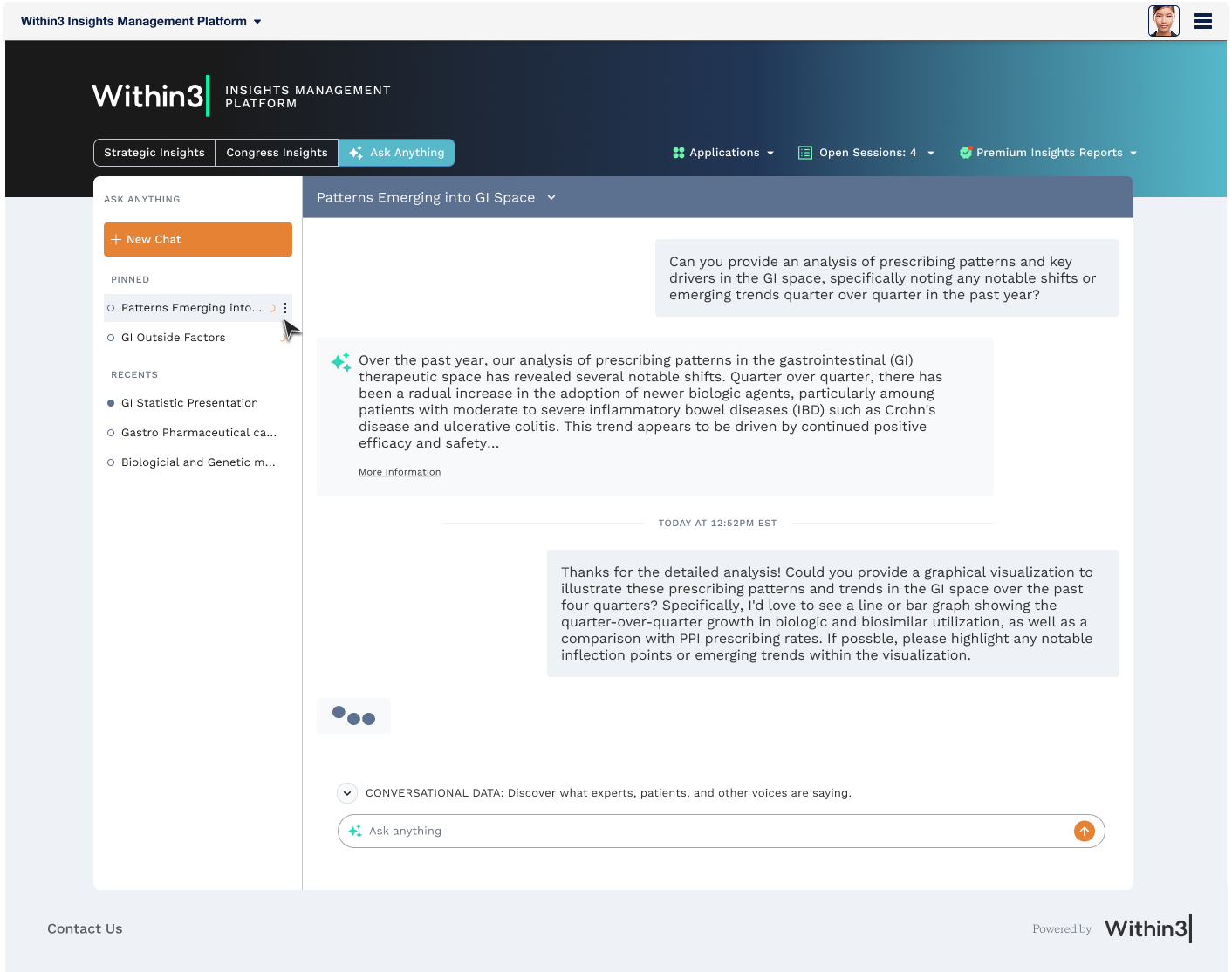
TL;DR: — Completed in Q2 2026, this project expanded upon a custom AI agent chat design originally launched by the Within3 product design team. As usage and user feedback grew, the need for enhanced functionality became increasingly clear. Key additions included a sidebar capable of storing multiple chats in most-recent order, unread message indicators, and a loading indicator to signal when the AI agent was actively generating a file. The sidebar was further refined with separate sections for pinned and recent chats, along with the ability to pin, rename, and delete individual chats. In the header, an AI-generated (and fully editable) chat title was introduced, alongside date and time indicators for each conversation

01. Gallery

showing the progress

02. Design Brief

expanding from basic to full power

The initial release of our AI chat agent was a big success among clients and immediately left feedback asking for additional functionality and abilities to suit their increasing needs. With the AI agent being released in Q1 2026, Q2 and Q3 have been dedicated to its expansion and improved experience. The initial asks were outlined:

  • Multiple chats
  • Ability to save chats
  • A naming (summarizing) feature for chats
  • Being able to delete, pin and rename chats
  • Indicators representing new/unchecked responses
  • Indicators of chat agent compiling answers or documentation
  • Document download
  • Time and date markers
  • Cleanup from initial rollout
    • Padding adjustments
    • Scrollbar alignment
    • Removal of outdated features

03. Mockups

09/09 items shipped

Inspiration

With a majority of AI models having an established and familiar UI, the approach for this expansion was to allow users to feel like they had used this chat agent before. Popular UIs like Claude and ChatGPT were just a few screens referenced when coming up with what worked best for our users and the end goal.

Components

01. Multiple Chats

Ability to click around from chat to chat without losing data

DONE

02. Pinned Chats

Pin important chats so they're always in view

DONE

03. Naming Chats

Renaming the chat to the user's preference

DONE

04. Action Menu Bar

Rename chats, pin chats and deleting chats are fundamental action items

DONE

05. New Indicators

Let's the user know that there are new responded from the AI agent

DONE

06. Spinner Indicator

Indicates the agent is currently thinking or producing content

DONE

07. Download Document Block

Tidy UI block for when an agent generated a word document, slideshow, CSV or PDF

DONE

08. Time and Date Markers

Ability to see when conversations have taken place by date and time

DONE

09. Cleanup

Cleaning up padding, scroll bar placement, text placements, headers for improved UX

DONE

04. Further Renditions

the cherry on top

In Progress...

01. Accessibility Checks

Making sure all links are tab accessible, all colors and font align with minimum AA standards.

SOON

02. Inline Suggested Questions

On topic followup questions provided by the AI to help guide the user into finding more info they may not have thought about

SOON

03. Animation

Adding in small animations to help create an illusion of faster load times as well as livening up the UI

SOON